
When reporting on a paid ads campaign for a client, proving new customer acquisition and revenue growth always becomes the main focus. Regardless of impressions, clicks, click-through rate, search impression share, or cost-per-click, the success of the campaign is weighed by the question, “How is this making the company money?”
In an ideal client-agency relationship, answering this question is easy. If the client uses a CRM platform like HubSpot or Salesforce with a built-in integration for Google Ads, new opportunities and closed won deals can be automatically attributed to your campaigns. Further, several e-commerce platforms, like Shopify or WooCommerce, integrate with Google Ads, making new orders and revenue reporting a simple task.
But what do you do when the client uses a CRM that is not built for digital advertising? No website connections, no Zapier automations, and no UTMs imported from digital ads campaigns make it very difficult to bridge data gaps to attribute revenue to campaigns and prove return on ad spend.
Using Google Sheets XLookup to Identify Customers from Ads
When data connections/attributions are limited, start with taking an audit of the data you have. This can help you establish major sources of truth and identify where your largest gaps are.
For example, I recently completed a campaign report for a client that did not have a CRM at all. They only worked off master excel spreadsheets, completely disconnected from any marketing efforts. After a quick audit, I identified the following data sources:
- Google Ads & Google Analytics: Campaign & website data
- CallRail: Lead data with at least last touch attribution
- Customer Excel Sheet: Customer revenue data with no direct attribution
In this situation, I had data to identify which leads came from an ads campaign, but no way to identify if these were qualified or converted to a customer. This left me in a difficult position to justify the campaign’s value.
To start bridging the gap, I filtered the customer spreadsheet to only show customers that were created in the last 6 months with revenue. This returned a list of net-new customers that were most relevant to the client.
Next, I exported calls from ads from CallRail. This returned a list of leads that are directly attributed to ads. I can use this data to find overlaps with my list of net-new customers, which will help me identify new customers from ads.
To find these overlapping leads from ads and net-new customers, I can use an XLOOKUP formula. According to Google Docs Help, “the XLOOKUP function returns the values in the result range based on the position where a match was found in the lookup range.”
XLOOKUP(search_key, lookup_range, result_range)Essentially, I will tell XLOOKUP to look for phone numbers from ads within the column of customer phone numbers, and return the revenue associated with the customer when a match is found. This will allow me to quickly identify customers and revenue from my ads.
I’ve walked through this process with sample data below.
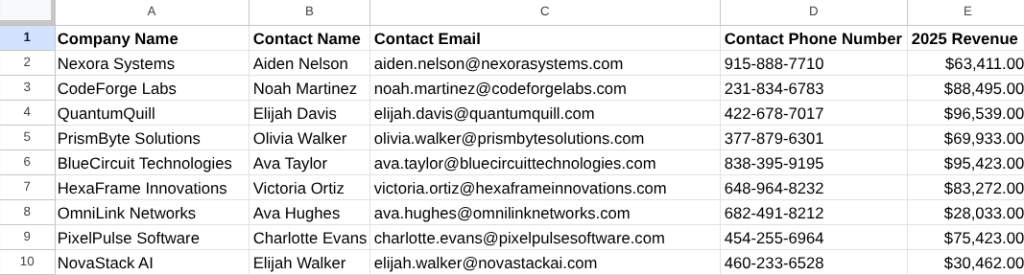
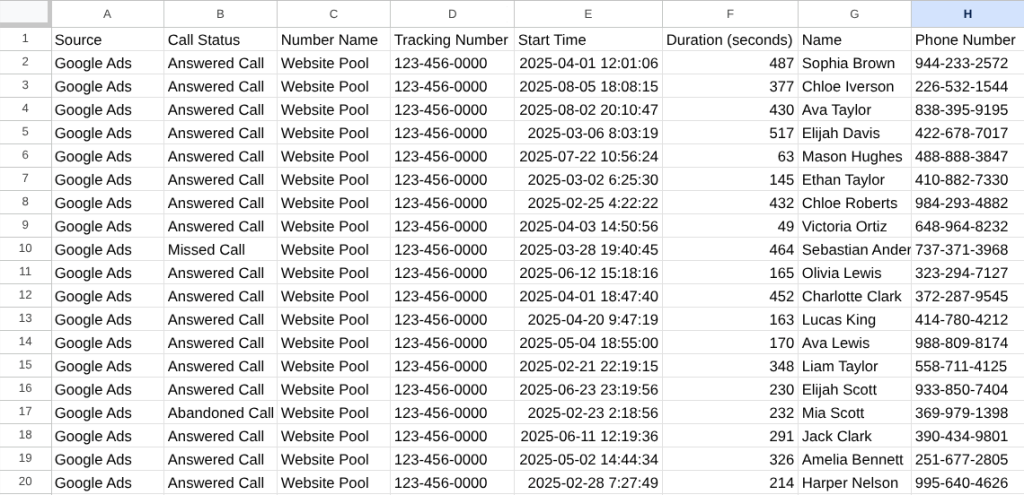
=XLOOKUP('CallRail Export'!H2,'Customer Data'!D:D,'Customer Data'!E:E)Using this formula, I added a column to my CallRail data export, and used XLOOKUP to pull in revenue by matching customer phone numbers with phone calls from ads.
Now, I can report revenue to my client, instead of just leads with a big data gap.

This process can be adapted to match emails with form submission data, company names with orders/invoices, or other lead information.
While this process is manual and will not eliminate all data gaps, it can be a useful tool to increase insights with the data at your disposal.
 Andy Hendricks
Leave a comment