
Paid media reporting is a daunting task for both agencies and internal marketing teams. With large budgets, varied goals, and mountains of data, it can be difficult to present campaign results in a digestible format.
Recently, marketers have been working towards automating reporting as much as possible to reduce spending hours on manual data input. A tool for automated reporting is Google Ads scripts, which can be scheduled to run automatically to export data or update campaigns. However, many digital marketers do not have programming or JavaScript experience, so Google Ads scripts can feel overwhelming.
I was in this camp, with no programming background, I felt that Google Ads Scripts were a tool that I could rarely use beyond pre-made templates. But, I was able to use Claude.ai to create a Google Ads reporting script.
The Prompt
I wanted help exporting data into a Google Sheet with campaign results segmented by month. I prompted Claude:
Can you help me write a Google Ads Script that accomplishes the following:
- Exports the following metrics to a Google Sheet:
- Impressions
- Clicks
- CTR
- Avg. CPC
- Cost
- Conversions
- Conv. Rate
- Cost / conv.
- Search impr. share
- The metrics should be segmented by campaign
- The metrics should be segmented by month
- The metrics should be for active campaigns only
- The metrics should be from year to date
Claude immediately created a script with instructions on how to add it to the Google Ads platform. However, the initial script failed to export any data. But I was able to paste the errors from Google ads back into Claude, where the code was corrected and able to run without issues.
The Result
After running the revised script, my campaign data successfully exported to a Google Sheet.
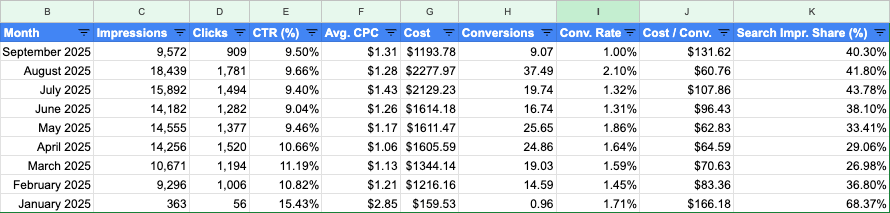
Now with the data formatted in a Google Sheet and segmented by month, I can easily create charts, apply heat maps, filter for best-performing months, paste tables into reports, and analyze the data without any manual input.
I can duplicate this script to other Google Ads accounts and schedule it to run automatically each month so that I always have relevant data in an easily usable format.
The Script
To use this script for your campaign reporting, you can simply copy the code below. The only change you will need to make is replacing YOUR_GOOGLE_SHEET_URL_HERE with a link to your Google Sheet.
function main() {
  // Configuration - Replace with your Google Sheet URL
  const SPREADSHEET_URL = 'YOUR_GOOGLE_SHEET_URL_HERE';
  const SHEET_NAME = 'Campaign Metrics';

  try {
    // Open the spreadsheet
    const spreadsheet = SpreadsheetApp.openByUrl(SPREADSHEET_URL);
    let sheet = spreadsheet.getSheetByName(SHEET_NAME);

    // Create sheet if it doesn't exist
    if (!sheet) {
      sheet = spreadsheet.insertSheet(SHEET_NAME);
    }

    // Clear existing data
    sheet.clear();

    // Set up headers
    const headers = [
      'Campaign Name',
      'Month',
      'Impressions',
      'Clicks',
      'CTR (%)',
      'Avg. CPC',
      'Cost',
      'Conversions',
      'Conv. Rate (%)',
      'Cost / Conv.',
      'Search Impr. Share (%)'
    ];

    sheet.getRange(1, 1, 1, headers.length).setValues([headers]);

    // Format header row
    const headerRange = sheet.getRange(1, 1, 1, headers.length);
    headerRange.setFontWeight('bold');
    headerRange.setBackground('#4285f4');
    headerRange.setFontColor('white');

    // Get year-to-date date range
    const currentDate = new Date();
    const startOfYear = new Date(currentDate.getFullYear(), 0, 1);

    console.log(`Fetching data from ${formatDate(startOfYear)} to ${formatDate(currentDate)}`);

    // Use a simpler query that gets daily data, which we'll aggregate by month
    const query = `
      SELECT
        CampaignName,
        Date,
        Impressions,
        Clicks,
        Ctr,
        AverageCpc,
        Cost,
        Conversions,
        ConversionRate,
        CostPerConversion,
        SearchImpressionShare
      FROM CAMPAIGN_PERFORMANCE_REPORT
      WHERE
        CampaignStatus = ENABLED
      DURING ${formatDate(startOfYear)},${formatDate(currentDate)}
    `;

    console.log('Running query...');

    const report = AdsApp.report(query);
    const rows = report.rows();
    const monthlyData = new Map(); // To aggregate data by campaign and month

    let rowCount = 0;

    // Process each row
    while (rows.hasNext()) {
      const row = rows.next();
      rowCount++;

      try {
        // Get values from the row
        const campaignName = row['CampaignName'];
        const dateStr = row['Date']; // Format: YYYY-MM-DD

        // Extract year and month from date
        const dateParts = dateStr.split('-');
        const year = dateParts[0];
        const month = dateParts[1];
        const monthKey = `${year}-${month}`;

        // Create a unique key for campaign + month combination
        const key = `${campaignName}_${monthKey}`;

        // Parse numeric values with proper error handling
        const impressions = parseInt(row['Impressions']) || 0;
        const clicks = parseInt(row['Clicks']) || 0;
        const ctr = parseFloat(row['Ctr']) || 0;
        const avgCpc = parseFloat(row['AverageCpc']) || 0;
        const cost = parseFloat(row['Cost']) || 0;
        const conversions = parseFloat(row['Conversions']) || 0;
        const conversionRate = parseFloat(row['ConversionRate']) || 0;
        const costPerConversion = parseFloat(row['CostPerConversion']) || 0;
        const searchImpressionShare = parseFloat(row['SearchImpressionShare']) || 0;

        // Format month name
        const monthName = formatMonthFromKey(monthKey);

        // If we already have data for this campaign+month, aggregate it
        if (monthlyData.has(key)) {
          const existing = monthlyData.get(key);
          existing.impressions += impressions;
          existing.clicks += clicks;
          existing.cost += cost;
          existing.conversions += conversions;

          // For impression share, we'll take the average (weighted by impressions)
          const totalImpressions = existing.impressions;
          if (totalImpressions > 0 && impressions > 0) {
            existing.searchImpressionShare = ((existing.searchImpressionShare * (totalImpressions - impressions)) + (searchImpressionShare * impressions)) / totalImpressions;
          }

        } else {
          // Add new entry
          monthlyData.set(key, {
            campaignName: campaignName,
            monthName: monthName,
            impressions: impressions,
            clicks: clicks,
            cost: cost,
            conversions: conversions,
            searchImpressionShare: searchImpressionShare
          });
        }

      } catch (rowError) {
        console.error('Error processing row:', rowError.toString());
      }
    }

    console.log(`Processed ${rowCount} rows, found ${monthlyData.size} unique campaign-month combinations`);

    // Convert map to array and calculate derived metrics
    const data = [];
    for (const [key, rowData] of monthlyData) {
      // Calculate derived metrics from aggregated data
      const ctr = rowData.impressions > 0 ? (rowData.clicks / rowData.impressions * 100) : 0;
      const avgCpc = rowData.clicks > 0 ? (rowData.cost / rowData.clicks) : 0;
      const conversionRate = rowData.clicks > 0 ? (rowData.conversions / rowData.clicks * 100) : 0;
      const costPerConversion = rowData.conversions > 0 ? (rowData.cost / rowData.conversions) : 0;

      data.push([
        rowData.campaignName,
        rowData.monthName,
        rowData.impressions,
        rowData.clicks,
        ctr,
        avgCpc,
        rowData.cost,
        rowData.conversions,
        conversionRate,
        costPerConversion,
        rowData.searchImpressionShare
      ]);
    }

    // Sort by campaign name, then by month
    data.sort((a, b) => {
      if (a[0] !== b[0]) return a[0].localeCompare(b[0]);
      return a[1].localeCompare(b[1]);
    });

    // Write data to sheet if we have any
    if (data.length > 0) {
      const dataRange = sheet.getRange(2, 1, data.length, headers.length);
      dataRange.setValues(data);

      // Format numeric columns
      formatNumericColumns(sheet, data.length);

      console.log(`Successfully exported ${data.length} rows of data to Google Sheet`);
    } else {
      console.log('No data found for the specified criteria');
      sheet.getRange(2, 1).setValue('No data found for active campaigns in the specified date range');

      // Debug: Try to get any campaign data
      console.log('Attempting to fetch basic campaign info for debugging...');
      try {
        const debugQuery = 'SELECT CampaignName, CampaignStatus, Impressions FROM CAMPAIGN_PERFORMANCE_REPORT WHERE CampaignStatus = ENABLED DURING LAST_30_DAYS';
        const debugReport = AdsApp.report(debugQuery);
        const debugRows = debugReport.rows();
        let campaignCount = 0;
        while (debugRows.hasNext() && campaignCount < 5) {
          const debugRow = debugRows.next();
          console.log(`Found campaign: ${debugRow['CampaignName']} (Status: ${debugRow['CampaignStatus']}, Impressions: ${debugRow['Impressions']})`);
          campaignCount++;
        }
        if (campaignCount === 0) {
          console.log('No active campaigns found in last 30 days');
        }
      } catch (debugError) {
        console.error('Debug query failed:', debugError.toString());
      }
    }

    // Auto-resize columns
    sheet.autoResizeColumns(1, headers.length);

    console.log('Export completed!');

  } catch (error) {
    console.error('Error in main function:', error.toString());
    console.error('Error stack:', error.stack);
  }
}

function formatDate(date) {
  const year = date.getFullYear();
  const month = String(date.getMonth() + 1).padStart(2, '0');
  const day = String(date.getDate()).padStart(2, '0');
  return `${year}${month}${day}`;
}

function formatMonthFromKey(monthKey) {
  // monthKey is in format "YYYY-MM"
  const monthNames = [
    'January', 'February', 'March', 'April', 'May', 'June',
    'July', 'August', 'September', 'October', 'November', 'December'
  ];

  const [year, month] = monthKey.split('-');
  const monthIndex = parseInt(month) - 1;

  if (monthIndex >= 0 && monthIndex < 12) {
    return `${monthNames[monthIndex]} ${year}`;
  }
  return `${monthKey}`;
}

function formatNumericColumns(sheet, dataRows) {
  if (dataRows === 0) return;

  // Format impressions, clicks (columns C, D) - no decimals
  sheet.getRange(2, 3, dataRows, 2).setNumberFormat('#,##0');

  // Format CTR (column E) - percentage with 2 decimals
  sheet.getRange(2, 5, dataRows, 1).setNumberFormat('0.00"%"');

  // Format Avg CPC, Cost, Cost/Conv (columns F, G, J) - currency
  sheet.getRange(2, 6, dataRows, 1).setNumberFormat('$0.00');
  sheet.getRange(2, 7, dataRows, 1).setNumberFormat('$0.00');
  sheet.getRange(2, 10, dataRows, 1).setNumberFormat('$0.00');

  // Format Conversions (column H) - 2 decimal places
  sheet.getRange(2, 8, dataRows, 1).setNumberFormat('0.00');

  // Format Conv Rate and Search Impr Share (columns I, K) - percentage
  sheet.getRange(2, 9, dataRows, 1).setNumberFormat('0.00"%"');
  sheet.getRange(2, 11, dataRows, 1).setNumberFormat('0.00"%"');
}Automating manual reporting steps should be a key priority for digital marketing agencies. Time wasted on exports, data entry, and formatting spreadsheets is time that could be spent on data analysis and campaign optimization.
 Andy Hendricks
Leave a comment